






Showing 1–8 of 32 resultsSorted by latest

Arylic Up2Stream Pro V3 | BT 5.0 | Wi-Fi | DAC | I2S | Receiver Module
With the Up2Stream Pro V3 Wi-Fi & Bluetooth Audio Receiver Module, you can stream your audio wirelessly to your speakers. With even more streaming possibilities than the Mini and all of its other features, it is the most complete and simplest way to enjoy music wirelessly. HighlightsEven more streaming possibilitiesDoubles as a USB DACSmall form factorSupports multiroom and TWS configurationFree Android and iOS App Product details Arylic Up2Stream Pro V3 Wi-Fi Bluetooth Audio Receiver Module With the Up2Stream Pro V3 Wi-Fi & Bluetooth Audio Receiver Module, you can stream your audio wirelessly to your speakers using Wi-Fi, Bluetooth 5.0, Airplay, DLNA, UPnP and Spotify Connect. It is the most complete and simplest way to enjoy music wirelessly. The compact design of the receiver will leave you with more space for your wild & creative ideas, so you can design with more freedom and add components to further improve your speaker system. The Up2stream Pro V3 wifi audio receiver has huge upgrades from the previous version. Now with Bluetooth 5.0, 7-Pin connector for SPDIF output, ADC Key (for external button board) and 2x I/O for external controls such as volume knobs. The Up2Stream Pro has a USB storage which can also double as a USB DAC, able to connect to a PC and stream PC audio digitally. Thanks to the upgraded CPU, you can now also change the device name for WiFi SSID and Bluetooth using the mobile app. The mobile app streams music with higher quality than AptX HD but also has features that allow you to configure multiple Up2Stream Pro's as a multi-room system or as True Wireless Stereo. You can even use the remote control for conveniently satisfying your music streaming needs. What's in the box?Up2Stream Pro7-pin cable for SPDIF output4-pin cable for analog input2-pin cable for 5V 1A inputWi-Fi AntennaUser manual Warning:Up2Stream Pro must use 5V-1A DC input, higher voltage power supply may damage the board.Show more Show less Frequently bought togetherPower Supply Bundle (PSS-1500E) Up2Stream Pro V3 | BT 5.0 | Wi-Fi | DAC | I2S | Receiver Module + PSS-1500E Switch-Mode PSU | 1,5A Normally:€ 79,90You save: € 1,25Combideal:€ 78,65 Add to cartArylic Up2Stream 2.1 Plate Amplifier
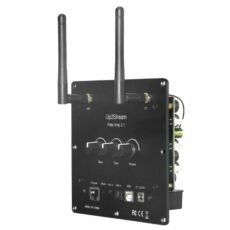
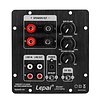
Up2Stream Plate AMP 2.1 is a WiFi and Bluetooth 5.0 2.1 channel plate amplifier that is easy for you to build your own high-quality wireless streaming speakers. Up2Stream Plate AMP 2.1 is a full range Class D plate amplifier provides 50W L&R channels and 100W subwoofer, 3.5mm Aux input, Optical input, USB input for PC connection, Volume, Tone and Bass rotary knob for sound adjustment HighlightsWiFi and Bluetooth 5.0Full range Class D plate amplifier4Stream appstreaming services: Spotify, Deezer, Tidal, Qobuz and more.Multiroom audio system Product details  Arylic Up2Stream Plate Amplifier 2.1 Multiroom Wireless Plate Amp Up2Stream Plate AMP 2.1 is a WiFi and Bluetooth 5.0 2.1 channel plate amplifier that is easy for you to build your own high-quality wireless streaming speakers. Up2Stream Plate AMP 2.1 is a full-range Class D plate amplifier that provides 50W L&R channels and 100W subwoofer, 3.5mm Aux input, Optical input, USB input for PC connection, Volume, Tone, and Bass rotary knob for sound adjustment. Once connected to your home network, using our 4Stream app you can play music from your mobile, NAS, or from online streaming services like Spotify, Deezer, Tidal, Qobuz, and more. With multiple devices, you can form a multiroom audio system and play the same music to each room in sync or play different music in different rooms. InterfaceWiFi Antenna: Socket Use to connect the antenna to receive WiFi signal.BT Antenna: Socket Use to connect the antenna to receive Bluetooth signal.Bass: Knob Knob for changing Bass level.Tone: Knob Knob for changing treble level.Volume: Knob Knob for changing the volume level. Press to switch source input.Ethernet Port: For network connection using RJ45 cable.Mode button: Press once to switch source input. Quickly Press twice to reset WiFi/Bluetooth connection. Quickly Press three times to do a factory reset. Long Press to turn on the device, press again to turn on.Aux in: For connection of analog audio signal using a 3.5mm to 3.5mm or 3.5mm to RCA cable.Opt in: For connection of digital audio signal using an optical/Toslink cable.USB port: For connection to PC to ast as USB DAC or to use our DSP tool ACPWorkbench.DC port: Use to connect the 12V-24V power supplyPH2.0-9P: WPS: Pins used for connecting external mode buttonW-LED, B-LED, L-LED, U-LED: Pins used for connecting external LED status lightKEY: Pins used for connecting the external button boardIR: Pins used for connecting external IR receiverSW -/+: Subwoofer speaker socketL -/+: Left Channel speaker socketR -/+: Right Channel speaker socket How To UseApp DownloadDownload the 4STREAM application from App Store for iOS based devices and Google Play Store for Android-based devices. The application supports English, Spanish, French, German, Italian, Portuguese, Korean, Simplified Chinese, Traditional Chinese, and Japanese. First Time Usage & BLE WiFi Setup1. Power up the device.2. Make sure your mobile has connected to your home network using 2.4G and your GPS and Bluetooth is on.3. Open 4Stream APP and wait for device discovery. This will take a couple of seconds.4. 4Stream will ask to check the indicator, there is no LED light on this device, just click on the indicator is blinking. (You can connect your own LEDs with the LED Pins or purchase and use our expansion board: button board)5. For Android devices, the system will ask for permission to use GPS data & File storage, please click accept to continue. This GPS permission is set up by Google for BLE usage, once setup is finished you can go to system settings and disable it, file storage permission is to let 4Stream access your mp3 files store in your mobile.6. 4Stream APP will list out all the devices available for setup, choose the one you want.7. 4Stream APP will then ask you to choose the network you want the device to connect to, choose the one you want to connect.8. Now enter a password for your network, if this is not the network you want the device to connect, you can change it to the desired one.9. Then you can change the name of the device. You can select a preset one or enter your own.10. After you define the name of the device, you will see it appears in the device list in 4Stream APP and now you can start streaming music. Connection via LANPlug in the RJ45 cable to the ethernet port, the device auto connects to your home network and will show on the app in about 10 seconds. (Note: your mobile phone and the device must be in the same network.) BluetoothTo use Bluetooth, switch to Bluetooth via 4Stream APP or by pressing the Volume knob or mode button. Then find the Bluetooth device SoundSystem_XXXX from your phone's Bluetooth setting and pair it. If you have changed the device name, “SoundSystem†will become the device name you changed. USB Audio Power up and connect the device to your PC with a USB cable. The PC will automatically discover a USB sound card and when you select it as the system audio output, the PC will send the audio output to the device in digital (44.1kHz/16bits). You can stream audio to other Up2Stream devices over multiroom functions. Note: There is about 3 seconds delay for multiroom slave devices.  Multiroom Function You can group multiple devices to form multiroom/multizone in 4Stream APP. Just click on the + icon on one of the devices and select other devices as a slave device. The master device then can stream music and sync to all slave devices in different rooms.  Web Player Interface Enter the IP address of the device in a web browser and you can access the web player interface. The web player can let you play/pause the current song, go previous or next song, control the volume, access the Pre-set songs you define in 4Stream APP, enter internet radio URL to listen to the radio, setup wifi connection, setup static IP address, do a manual firmware update and factory reset. *You can check device ip address in 4stream app, click on device settings icon and select speaker info.**If you want to set up wifi in this interface, connect this device (SSID: SoundSystem_xxxx) to your phone/pc wifi directly, the default IP address is 10.10.10.254.***The default password is admin  Up2Stream ACPWorkbench (Sold Separately)Connect the device to your PC with USB cable, open the windows program ACPWorkbench and you can tune audio effects conveniently in real-time, including music noise suppressor, virtual bass, stereo widener, exciter, 10 bands EQ, configure output channel and PINs definition. After editing the audio effects, you need to save the changes to the device for the effects to remain. You can get more information from Arylic's website.  Firmware UpdateThe application will notify you in-app when there is new firmware available. It is recommended to update the firmware whenever it is available, as this might not only correct bugs or improves performance, but also might add new features or services. Package IncludesUp2Stream Plate AMP 2.1 x1Internal Speaker Cable x3Antenna x2User ManualShow more Show lessArylic 24V 4.16A AC/DC Power Adapter
24V 4.16A Power Adapter designed to be used among others with the Up2Stream Amp. HighlightsUniversal power supplyReplacement for Power supply included in the S, A and SA seriesCE and GS certifiedIEC power plug included Product details Arylic 24V 4.16A AC/DC Power Adapter This is the perfect power supply to use with the Up2Stream Amp. Its applications are of course not limited to use with the Up2Stream Amp as it can be used with any product that requires 24V to operate.Arylic ADC-KEY Button Expansion Board
The perfect control panel for your DIY device. This external board contains multiple control buttons. For the Up2Stream: Mini v3, Pro v3. AMP 2.0 v3, AMP 2.1 from Arylic. HighlightsOnboard IR receiverMultiple control buttons4 mode LED indicatorsCable included Product details Arylic ADC-KEY Button Expansion Board The Arylic ADC-Key expansion board adds functionalities to your Arylic device including: Play/pause, volume up, volume down, pervious song, next song, standby and switch mode, on board IR receiver, connector for IR Extension Board and four selected input LED indicators for Wifi, Bluetooth, AUX and USB. Compatibility This ADC-KEY Board is compatible with the following Arylic products:Up2Stream Mini v3Up2Stream Pro v3Up2Stream AMP 2.0 v3Up2Stream AMP 2.1 What's in the box?Arylic ADC-KEY BoardConnector cable SpecificationsSize: 68x64mmShow more Show lessArylic Up2Stream 2.0 Amp Case
Acrylic case for the Arylic Up2Stream series products. HighlightsSimple assemblyLow-Ampfile lookAll essentials included Product details Arylic Up2Stream Amp CaseDon't feel like making a fancy enclosure for your board? Here's a simple to assemble acrylic case for the Arylic Up2Stream Amp. All hardware is included of course.Arylic Up2Stream 2.1 Amp Case
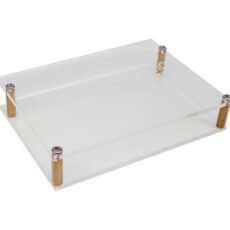
Acrylic case for the Arylic Up2Stream series products. HighlightsSimple assemblyLow-Ampfile lookAll essentials included Ampduct DetailsArylic Up2Stream Amp 2.1 Case Don't feel like making a fancy enclosure for your board? Here's a simple to assemble acrylic case for the Arylic Up2Stream Amp 2.1. All hardware is included of course.Arylic Amp Sub Plate
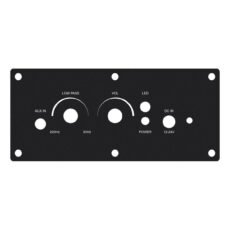
Mounting panel for the Up2Stream Sub Amp including mounting accessories Dimensions104*46mmPackage IncludesMain Unit x1Screw PA3*15mm x6Screw PM3*6mm x1EVA Sticker 50*10mm x2EVA Sticker 10*100mm x3Frequently bought togetherUp2stream HD Pack Amp Sub Plate + Up2Stream Sub AMP Amplifier module Normally:€ 117,90You save: € 5,-Combideal:€ 112,90 Add to cart